Sales and CRM Guide: Deals, Quotes, Invoices
The Sales section of the CRM menu tracks what happens after a lead says yes. A deal carries an amount, a stage and two dates, and you can view deals as a list, a pipeline board or a calendar. Quotes and Invoices are line-item documents you build from the Product catalogue and download as PDF. Analytics adds it all up.
The screens are:
- CRM > Sales > Deal Calendar, Deals, Deal Groups, Quotes, Invoices
- CRM > Product
- CRM > Analytics
Deal Groups
CRM > Sales > Deal Groups works the same way as Lead Groups and Contact Groups. It's a named list that a campaign can dial. The columns are Group Name, Description, Total Deals, Total CNAM and Operations (Edit, View deals, Filter, Start CNAM or Stop CNAM, Drop CNAM).
Add new gives you:
- Title and Description.
- Group Type, which has one option: Internal Deals.
- Import Deals (Optional), with the usual file, custom file or copy-from-group sources.
- Scan for CNAM.
You don't define pipeline stages in Deal Groups. The stage list is fixed in the current build (see below).
Deals
Go to CRM > Sales > Deals. The top buttons are search, Add new, Activity, Board, Import, Export, Timeline and Refresh. The list shows First Name, Last Name, Phone, E-Mail, Status and Operations (View activity timeline, Edit Deal, View CNAM record when present, Update CNAM record). Delete Selected removes the rows you've ticked.
The search panel has Deal Group, Name, Phone, E-Mail, Tag, Assigned Agent, Filter ([No Filter], [Invalid Contacts], [Duplicate Contacts]), Date, Saved Segment, Segment action and Save search as. Admins also see Client.
Deal form
- Personal Information: First Name, Last Name, Status (Unassigned, In Progress, Processed, Junk Lead), Salutation.
- Deal Details: Stage, Start Date, End Date, Amount, Currency ($, €, ¥, R$, ₹).
- Client: Phone Number (required), E-Mail, Address, Company.
- Messanger: Chat Massage, Whatsapp or Skype plus the handle. Add … gives you more rows.
- Groups: Related Groups and Tags.
- Additional Data, when extra fields are configured.
A deal has no product field. You attach products on a quote or an invoice, where the Source can point at the deal.
On the board and in the Activity view, the deal's name is First Name plus Last Name. So for a company deal, put the deal title in First Name.
Stages
Stage has eight values, in this order: New, Create Papers, Invoice, In Progress, Final Invoice, Deal Won, Deal Lost, Analyze Failure.
- Deal Won counts as won.
- Deal Lost and Analyze Failure count as lost.
The stages are stored per account in the database. On this build there's no screen to add or rename them. If a disposition is set to Convert to Deal (won), it creates the deal straight into Deal Won.
Board (kanban)
The Board button opens the Pipeline Board. There's one column per stage, and each header shows the number of deals and the sum of their amounts. Each deal gets a card with its name, the amount with currency and the phone number.
To change a deal's stage, drag its card to another column. The change saves straight away. There's no Save button. Click a card to open the deal's timeline. The board loads up to 500 deals. The buttons on this view are Add new, Refresh, Activity and Go back.
Activity
The Activity button lists "Activity – Deals Nearing Due Date". These are open deals (anything not in Deal Won, Deal Lost or Analyze Failure) whose End Date is within the next 7 days or already past.
The columns are Deal Name, Stage, Due Date, Days Left and Status. Status is a badge:
- Overdue (with the number of days)
- Due Today
- Urgent (3 days or less)
- Upcoming
Deal Calendar
CRM > Sales > Deal Calendar puts every deal that has a Start Date on a month calendar. A green marker sits on the Start Date and a red one on the End Date. Click a marker to see the deal name, amount, stage and the date, labelled START DATE or END DATE. The buttons are Add new (opens the deal form) and Refresh. Deals without a Start Date don't appear.
Products
CRM > Product is the catalogue that quotes and invoices pick from. The columns are Product Image, Product Name, Product Type, Product Description, Product Price and Operations. The top buttons are search, Add new, Import, Export and Refresh.
The form sits under Product Information:
- Product Name
- Product Type (virtual / IT product, Physical)
- Product Image (PNG, JPG, GIF)
- Subscription (One Time, Monthly, Bianny, Annualy)
- Product visibility (Active, Inactive)
- Unit & Quantity (Metre, Litre, Gram or Kilogram, plus a quantity)
- Currency ($, €, ¥, R$, ₹)
- Price
- Product Description
The search panel filters on Name, Filter and Date.
Quotes
Go to CRM > Sales > Quotes. The top buttons are search, Add new and Refresh. The form has Save, Reset and Cancel. The list has Quotes #, Quotes Stage, Company Name, Source, Deal/Lead/Contact, Product Name and Operations. Delete Selected removes the rows you've ticked.
Each row has two icons. View shows the quote as a PDF in a popup. Download saves the same PDF. There's no Edit icon on a quote row, so get the content right before you save. If you don't, you'll have to delete it and create it again.
Creating a quote
- Click Add new.
- Under Quotes Information, enter Quotes # (free text, not generated). Pick a Quote Stage (new, Sent to Client, Accepted, Decline, Analyze Decline) and enter a Subject.
- Set Source to Lead, Deal or Contact. A matching dropdown appears (Leads, Deals or Contacts) listing the groups of that type. Pick the group that holds the record.
- Pick the Company.
- Write the proposal text in Purposal (a rich-text editor).
- Under Product, choose a product in Products. Price fills in from the catalogue. Enter QTY and Discount %, and Total Amount is calculated for you. Click Add … for another line.
- Click Save.
Here's what a quote doesn't do. It doesn't email anything, and it doesn't turn into an invoice. "Sent to Client" is a stage you set by hand after you've sent the PDF yourself. The code contains a "Quotes To Invoice" page, but nothing in the interface links to it, so in practice you raise the invoice separately.
Invoices
CRM > Sales > Invoices mirrors Quotes, with the same buttons and the same form:
- Invoice Information: Invoice #, Invoice Stage (the same five values: new, Sent to Client, Accepted, Decline, Analyze Decline), Subject, Source, Leads/Deals/Contacts, Company.
- The Product lines: Products, QTY, Discount %, Total Amount, Add …
The list shows Invoice #, Invoice Stage, Company Name, Source, Deal/Lead/Contact, Product Detail(Name – Price – QTY – Total) and Operations (View and Download, both PDF).
An invoice has no paid, unpaid or partially paid status. There's no payment recording and no email sending. If you need to track payment, agree a convention for the Subject or the stage.
Analytics
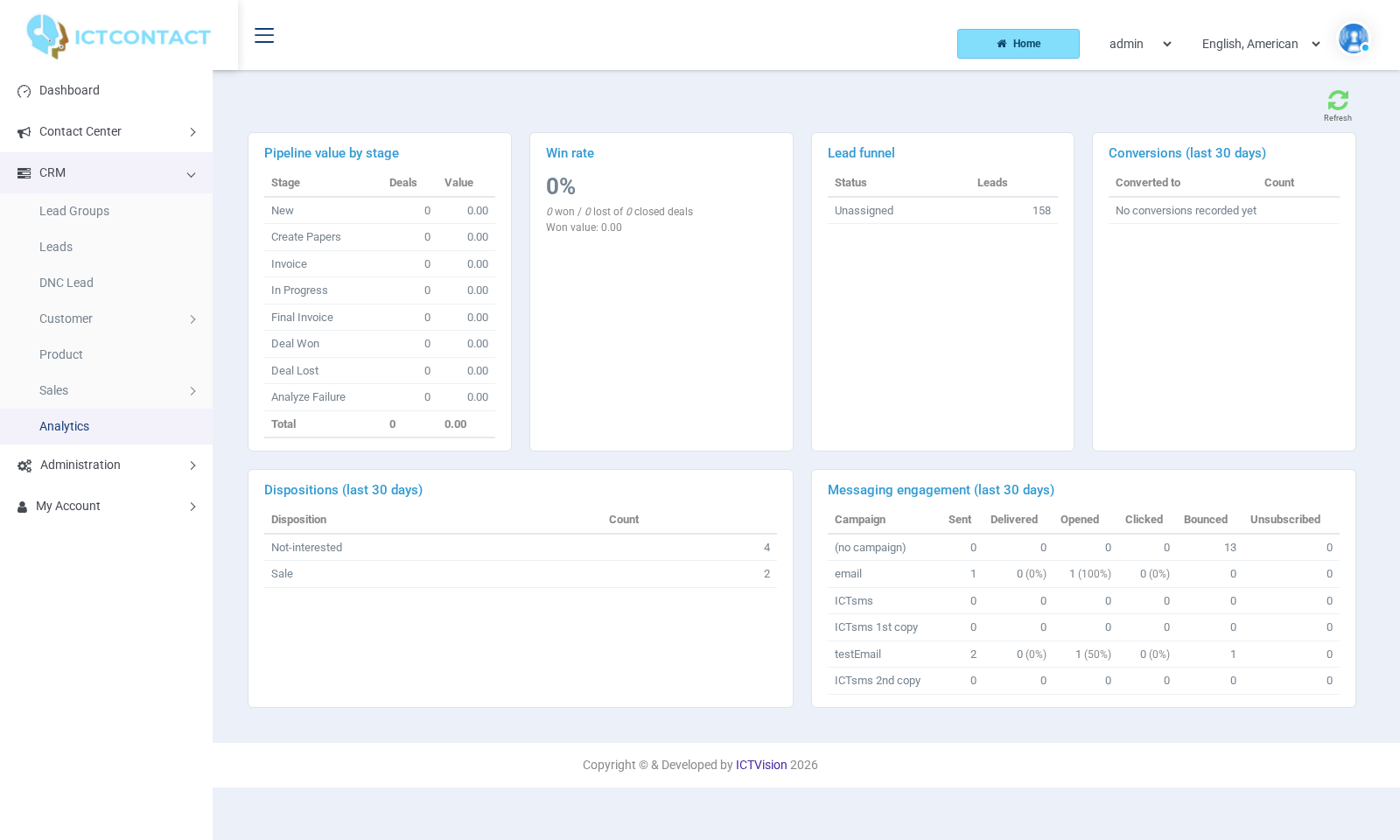
CRM > Analytics is a read-only page with a Refresh button. Non-admin users see their own records. Admins see everything. The cards are:
- Pipeline value by stage: a table of Stage, Deals and Value, with a Total row.
- Win rate: the percentage of closed deals that are won, with "won / lost of closed deals" and Won value underneath. Closed means Deal Won, Deal Lost or Analyze Failure.
- Lead funnel: a count of Leads for each Status value present in your leads (Unassigned, In Progress, Processed, Junk Lead, and Converted for leads a disposition has turned into a contact or deal).
- Conversions (last 30 days): Converted to (deal or contact) and Count, from dispositions that converted a lead.
- Dispositions (last 30 days): Disposition and Count.
- Messaging engagement (last 30 days): per Campaign, Sent, Delivered, Opened, Clicked, Bounced, Unsubscribed. It shows "No message events yet" until tracked SMS or email campaigns have run.