
Auto dialer software places calls from a contact list on its own and hands the answered ones to your agents. ICTContact runs this on Asterisk, so one campaign can work through thousands of numbers, tell a live person from a voicemail box, and connect only the real answers to an agent who is free right now.
That last part is where most of the value sits. An agent dialing by hand spends the bulk of the hour listening to ring tones, busy signals and answering machines. The dialer absorbs all of that so your team only hears people who picked up.
What happens between the contact list and the agent
The path a single call takes is short, but there are five or six decisions inside it. Here’s the whole flow.
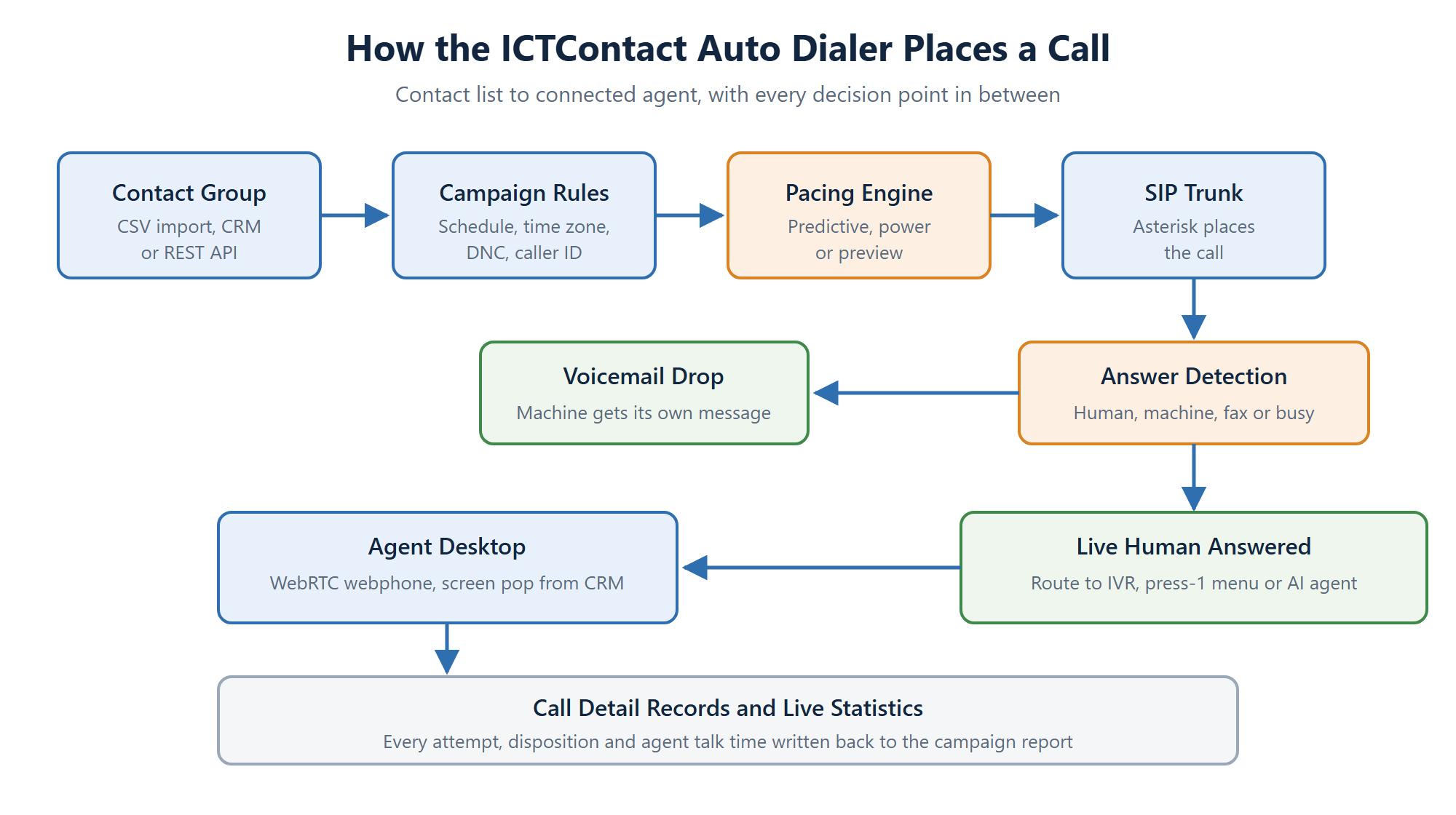
You load a contact group by CSV, by REST API or straight from the built-in CRM. The campaign carries the rules: when it may dial, which time zones are in play, which numbers sit on the do-not-call list, and what caller ID to present. The pacing engine decides how many lines to open. Asterisk places the call over your SIP trunk, works out what answered, and routes accordingly.
Three ways to pace a campaign
Pacing is the difference between a dialer that keeps agents busy and one that annoys the people you’re calling.
- Predictive. The system watches how long calls last and how fast agents free up, then dials ahead of them so a connected call is waiting the moment someone hangs up. Best for large lists and teams of five or more.
- Power. A fixed number of lines per available agent. Simpler and easier to reason about. Good when your contact quality is high and you can’t afford dropped calls.
- Preview. The agent sees the record first and chooses when to dial. Slower on volume, much better for high value accounts where the agent needs to read the history before speaking.
You set this per campaign, not per system, so a collections list and a renewals list can run different modes on the same platform at the same time.
Answer detection keeps your agents off voicemail
When the far end picks up, the dialer has to work out what it’s talking to. Answering machine detection separates a live human from a recorded greeting, a fax tone or a network message. Humans go to an agent. Machines get a voicemail drop instead, which means the contact still hears from you without burning agent time.
Detection is never perfect on any platform, so ICTContact lets you tune the sensitivity. Push it toward caution and you send a few real people to voicemail. Push it the other way and agents occasionally land on a machine. Most teams settle after a week of watching their own numbers.
What the agent sees
Connected calls land in a browser. The WebRTC webphone means no desk phone, no softphone install and no VPN. An agent needs a headset and a Chrome tab. The customer record opens alongside the call, so the agent isn’t asking for an account number that the dialer already had.
Not every answered call needs a person. You can route to an IVR menu, to a press-1 campaign that only escalates people who show interest, or to the AI voice agent for the routine questions that don’t need a human at all.
Compliance is a campaign setting, not an afterthought
Calling rules differ by country and by industry, and getting them wrong is expensive. ICTContact handles the common ones at campaign level: do-not-call list checks before each attempt, time zone windows so you don’t ring someone at 6am, per-campaign caller ID, retry limits, and full call detail records if you ever need to show what you did and when.
Reporting you can act on
Every attempt writes a record. You get dial counts, connect rates, average talk time, disposition breakdowns and agent-level activity, live while the campaign runs and in the CDR afterwards. That’s how you find out that Tuesday mornings connect twice as well as Friday afternoons, or that one list segment is burning attempts on dead numbers.
Where an auto dialer is the wrong tool
Worth saying plainly. If your list is under a few hundred contacts, or your agents need ten minutes of prep per call, or your conversations are genuinely one-off, a dialer adds overhead without saving much. Predictive pacing in particular needs volume and a reasonable agent count before the maths works in your favour. Preview mode or plain click-to-dial suits those teams better.
Frequently asked questions
What’s the difference between an auto dialer and a predictive dialer?
An auto dialer is the general category: any system that places calls from a list without a person pressing the digits. A predictive dialer is one pacing strategy inside that category, the one that dials ahead of agent availability using live campaign statistics. ICTContact gives you predictive along with power and preview.
How many agents do I need before predictive dialing helps?
Around five is the usual floor. Below that the prediction has too little data to work with and you’ll see either idle agents or dropped calls. Smaller teams get more out of power or preview mode.
Does the auto dialer work with my existing phone provider?
Yes, if they give you a SIP trunk. ICTContact sits on Asterisk and connects to standard SIP providers. You can also run multiple trunks and route campaigns across them.
Can I trigger calls from my own application?
You can. The REST API covers contacts, campaigns and call control, so your CRM or billing system can start a campaign or place a single call without anyone logging into the interface.
How does the dialer avoid calling people on a do-not-call list?
DNC lists load into the system and get checked before each attempt. Numbers on the list are skipped and logged as skipped, so your reporting shows the suppression rather than hiding it.
Is this a hosted service or something I install?
Both are available. You can run ICTContact on your own server or take it hosted. Multi-tenant deployment is supported either way, which is what service providers use to resell it under their own brand. See pricing for the current editions.