
An Appointment Reminder is an automated communication solution that contacts recipients from a predefined contact list and delivers reminders via SMS, email, or voice calls. With a single action, organizations can notify customers, patients, or staff about upcoming appointments, meetings, or events, ensuring timely awareness and preparation.
Appointment reminders act as proactive alerts, helping recipients remember important schedules. Their use has grown rapidly across multiple industries, including healthcare, corporate offices, and service-based organizations. In healthcare settings such as hospitals and clinics, appointment reminders play a critical role in notifying patients about scheduled visits, significantly reducing missed appointments.
Since appointments are often booked days or weeks in advance, it is easy for recipients to forget the exact date and time in today’s busy routines. ICTContact enables organizations to send automated reminders a day or even a few hours before the scheduled time, improving attendance, operational efficiency, and overall service quality.
Uses And Benefits Of Using Appointment Reminder Software In Business
There are many benefits of using automated appointment reminders to remind your clients of upcoming appointments, its benefits for both you and for your clients. Let us see some of these benefits.
1. Using an appointment reminder in your offices or business has the biggest benefit because it saves your time and money by preventing miss appointment. Sometimes company staff forgets the time of the meeting, and they arrive late to the meeting, its waste of important time. By using an appointment reminder, you can save time by sending an alert message a few hours before the meeting time to alert the staff.
2. By using automated appointment reminder software, you can monitor the results of appointments; you have no need to transfer the responses of calls manually. By using appointment reminders, you monitor real-time responses and save time.
3. By using appointment reminder software, you can cover the appointment slots very fast. You can confirm who shows the availability ofan appointment and who does not show availability, its enable you to fill this vacant slot effectively.
4. Appointment reminder software increases patient satisfaction by sending them an alert message to remind their appointment.
5. Some businesses or companies do phone or send postal card reminders for upcoming events or appointments. They record the response of phone calls, whether it confirms an appointment or notes are manually taken, it’s very hard and time-consuming work. Automated appointment reminders ease the work of the admin and eliminate manual entry.
Importance of Appointment Reminders
Appointment reminders are beneficial for both parties involved in an appointment. For example, in healthcare settings, appointments with doctors are often scheduled weeks or even months in advance. In the middle of everyday routines and busy schedules, it is easy for such appointments to slip the minds of both patients and providers.
Traditionally, appointment reminders relied on postcards or manual phone calls. However, these methods are inefficient and unreliable. Reminder cards can be misplaced or delayed, and making reminder calls consumes significant time and resources while increasing operational costs.
Virtual appointment reminders offer a far more effective alternative. With ICTContact, organizations can send automated reminders via voice calls, SMS, or email, ensuring timely delivery and higher response rates. These reminders help reduce missed appointments, optimize schedules, and minimize the administrative burden on staff, allowing them to focus on more critical tasks instead of repeatedly rescheduling appointments.
Creating a new IVR Message using the Message Designer:
Message Designer enables the creation of sophisticated telephony voice messages that play when a call is received. It supports combining voice recordings, text-to-speech, alphabet-to-speech, numbers and digits-to-speech, as well as date and time announcements. Additionally, it includes an application for capturing responses during reminder calls.
Here are the steps to create a new message via message designer:
- Navigate to Messages → Message Designer → New IVR Message.
- Enter a name and description for the IVR message. Initially, the IVR Message fieldset will be empty. This area will populate as new applications are created and added to the message.
- From the ‘Application’ dropdown, select the desired applications. A configuration form for the selected application will appear. Set the required options, then click ‘Add’ to include the application in the IVR Message fieldset on the right.
- The newly added application will appear at the end of the message sequence. To reorder, simply drag and drop applications within the IVR Message fieldset.
- Once the IVR message is configured as desired, click ‘Save’ at the top left of the form to save your message.
IVR Message Applications
The following are the applications available in Message Designer, along with brief descriptions of their functionality:
- Play Audio:
Adds an existing uploaded recording to the current message. - TTS (Text-to-Speech):
Converts the entered text into speech and adds it to the current message. This text will be voiced when the call is placed. - Say Alpha:
Adds alphabets or a variable with an alphabetic value to the current message. - Say Digit:
Adds digits or a variable containing numeric digits to the current message. - Say Number:
Adds a number or a variable with a numeric value to the current message. - Say Date:
Adds a date or a variable containing a date value to the current message. - Say Time:
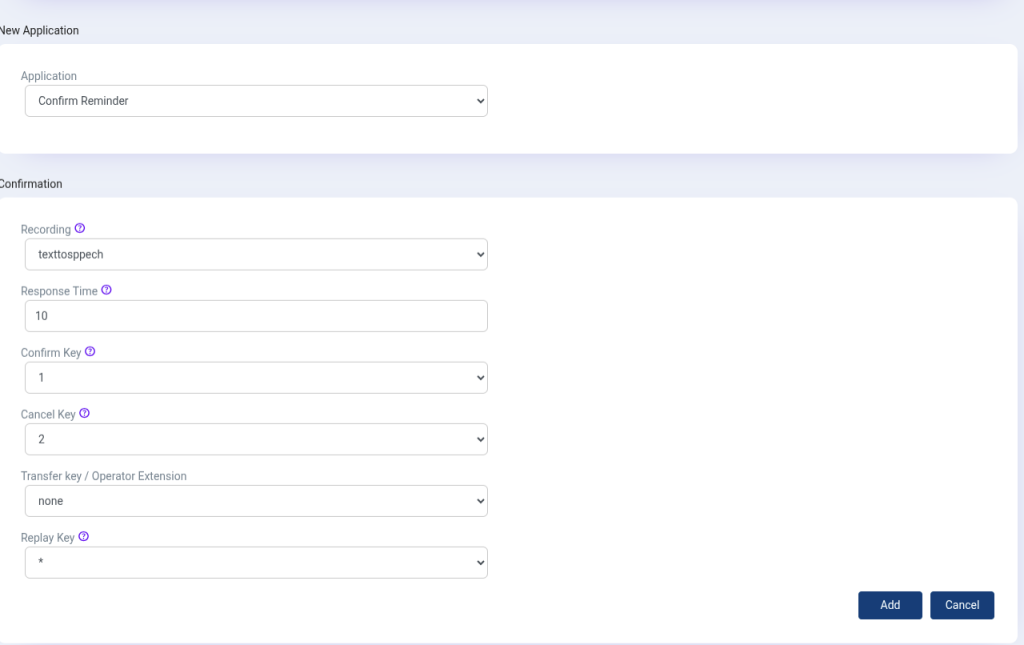
Adds a time or a variable containing a time value to the current message. - Confirm Reminder:
Adds interactive functionality to the message. The system plays a voice prompt (e.g., asking the recipient to press a key).- Press 1 to confirm the appointment
- Press 2 to cancel the appointment
- Press 0 (configurable) to transfer the call to a live agent. The agent’s extension number can be set within this application.
For more details about the Appointment reminder, visit → https://www.ictbroadcast.com/appointment-reminder-auto-dialer/