
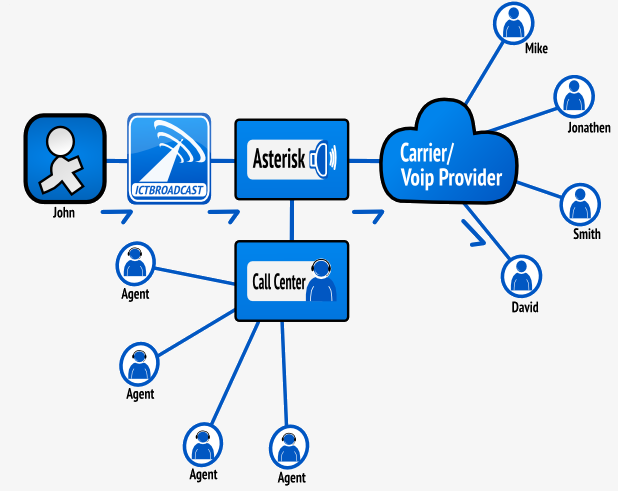
The Press 1 Campaign is one of the most effective telemarketing solutions for businesses looking to engage a targeted contact list. Also known as Interactive Voice Broadcasting, it is easy to set up and run. The campaign automatically dials contacts from your list, and when a recipient answers, ICTContact plays a pre-recorded message. If the contact wishes to speak with a live agent, they simply press “1” to be connected immediately.
This powerful Interactive Voice Response (IVR) tool helps filter genuinely interested prospects, enabling sales teams to focus on warm leads, increase engagement, and improve conversion rates.
If you’re going for a voice broadcasting campaign, you’ll need to decide whether your message will be just an announcement or if you want to give your prospects the ability to press 1 on their phone to be connected with a live agent of your company. If you go for the second option, then interactive broadcasting is what you need. This gives you instant results and allows you to speak to your prospect when they are most interested.
How It Works:
- Auto-Dial: The system automatically calls numbers from a predefined contact list.
- Recorded Message: When a recipient answers, a pre-recorded message delivers information about an offer or asks a question.
- Interactive Prompt: The message prompts the listener to press “1” if they are interested.
- Call Transfer: When “1” is pressed, the call is instantly transferred to a live agent or another designated destination.
- Additional Options: Recipients can press other keys for specific actions, such as “9” to opt out or leave a message, depending on the campaign configuration.
Inbound Support in Interactive Campaigns
The Inbound Interactive Campaign allows businesses to run interactive campaigns on incoming calls. When customers call the DID numbers published by the company, the Auto Dialer Interactive or Press 1 Campaign plays a pre-recorded message. Callers can navigate through the recorded prompts, or if they wish to speak with a live agent, they can press “1” to be connected immediately.
This feature is particularly valuable for call centers facing high call volumes or limited agent availability. Customers can resolve issues or register complaints automatically without waiting in queues. By handling queries through an Inbound Interactive Campaign, businesses save time for both agents and customers, while ensuring efficient and seamless customer support.
Key Benefits:
- Targeted Lead Connection: Engages only with genuinely interested customers, ensuring your sales efforts focus on high-potential prospects.
- Enhanced Efficiency: Streamlines workflows by directing qualified leads straight to your sales team, saving time and resources.
- High Scalability: Capable of reaching thousands of customers rapidly without compromising quality.
- Versatile Applications: Ideal for sales outreach, surveys, information sharing, and appointment scheduling.
How to Create an External Call Center Agent in ICTContact for the press 1 campaign
ExternalAgent:
The External Agent feature in ICTContact enables agents to participate in the call center operations using their external phone lines or devices. This flexibility allows agents to work remotely, leveraging their own mobile phones or landlines. External agents receive calls routed through the ICTBroadcast system, ensuring seamless integration with the overall call center workflow
- Login to ICTContact via admin/user account
- Open the navigation menu and select the main menu “Administration.”
- Select the sub-menu “Agent/Extension” under the main menu and click on it.
- Click on the “New Extension” button on the top right side of the recording list page.
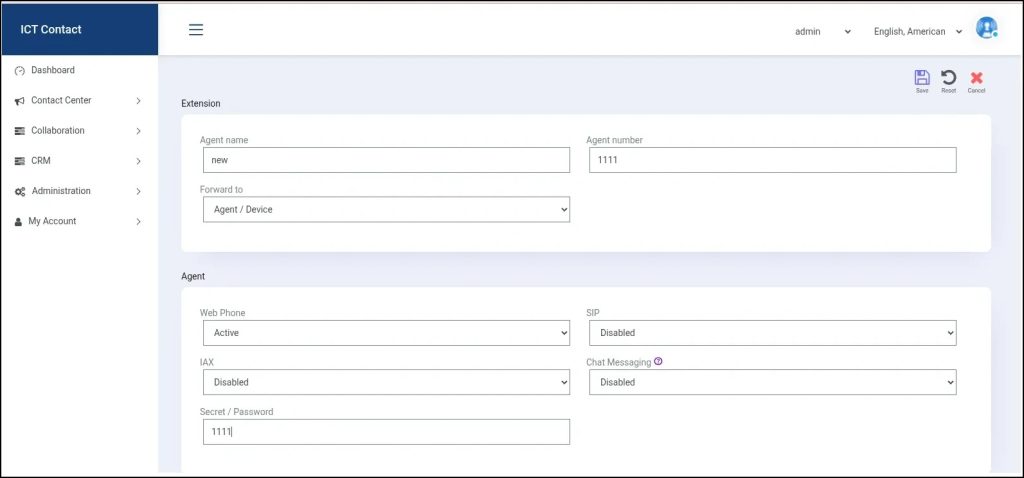
- Page open, enter the required information in fields boxes.
- Enter the agent name, agent number, and select the forward to option as an external call center.
IP/hostname of provider
If you are using ip based trunk/provider, then enter ip address otherwis,e add the domain name of the company for which you are using the provider.
Set the protocol
Set the protocol as SIP because for voice calls sip provider will be used.
User name and password
Enter the user name and password of your provider.
Extension/phone & call limit
The extension phone number will be the number of the external agent on which call will be transferred when the recipient transfers the call. And the call limit means the number of calls an external extension will handle.
For more detail visit → https://www.ictbroadcast.com/press 1-campaign-for-interactive-voice-broadcasting/