
Client Management Guide — Multi-Tenant & Reseller Setup
ICTContact supports multi-tenant deployment, meaning you can host multiple clients on a single ICTContact instance. Each client gets their own isolated account with their own campaigns, contacts, agents, credit balance, and channel limit. This is designed for ISPs, telecom resellers, and managed service providers.
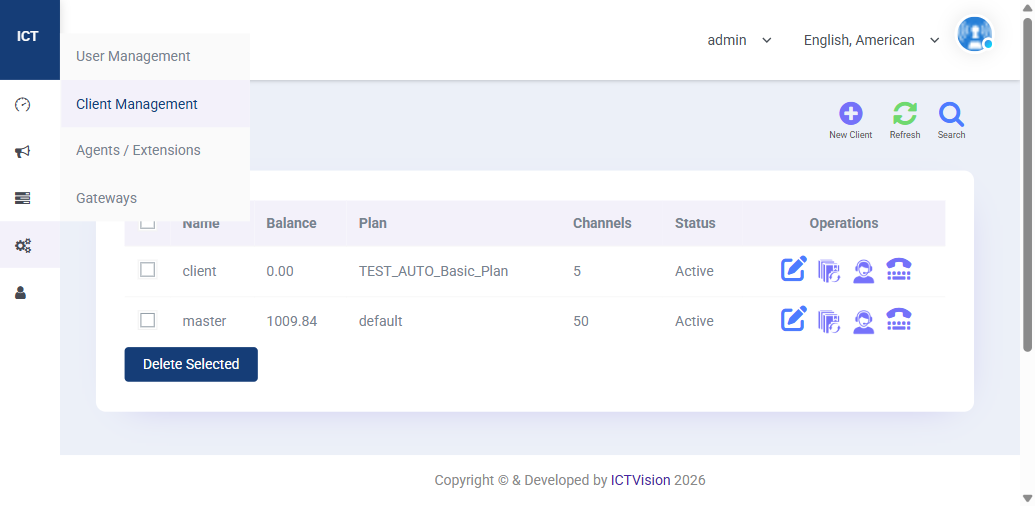
Client List Columns
| Column | Meaning |
|---|---|
| Name | Client account name |
| Balance | Current credit balance in USD |
| Plan | Rate Plan assigned — determines per-minute call rates |
| Channels | Maximum simultaneous calls allowed for this client |
| Status | Active or Suspended |
| Operations | Edit, Manage Agents, Manage Users, Manage Extensions |
Creating a New Client
- Go to Client Management in the admin navigation
- Click New Client
- Enter client name, email, and contact details
- Assign a Rate Plan (set up Rate Plans first under Billing)
- Set Channel Limit — how many simultaneous calls this client can run
- Add opening credit balance
- Click Save
Once created, the client can log in with their own credentials and manage their own campaigns, contacts, and agents — completely isolated from other clients.
Managing Client Resources
Each client entry has 4 action icons:
- Edit (pencil) — update client details, plan, channel limit, or status
- Manage Agents — add/edit agents that belong to this client
- Manage Users — add/edit user logins for this client
- Manage Extensions — configure SIP extensions for this client’s agents
Topping Up Client Credit
- Go to Billing > Payments
- Find the client account
- Click Add Payment
- Enter the amount and payment reference
- Save — the credit is added to the client’s balance immediately
Suspending a Client
To temporarily disable a client’s access without deleting their data, edit the client and set Status to Suspended. All their campaigns stop and their agents can’t log in. Reactivate at any time by setting Status back to Active.
The “master” Account
The “master” account you see in the client list is the primary reseller account with a 50-channel limit and the default rate plan. This is the base account that comes pre-configured. Your own admin campaigns run under this account.
Related: Billing & Rate Plans Guide | User Management | Agent/Extension Guide | Full User Guide