
FAX Documents Guide
The FAX Documents module lets you upload, manage, and send fax documents through ICTContact’s fax campaigns. You can store PDF and TIFF files in the system and reuse them across multiple fax campaigns without re-uploading each time.
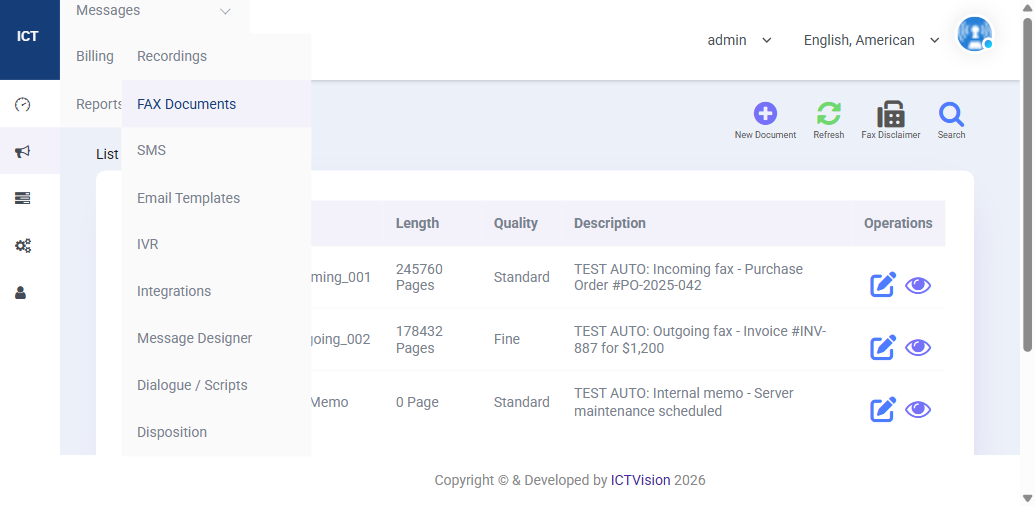
Document List Columns
| Column | Meaning |
|---|---|
| Name | Document filename (truncated in list view) |
| Length | File size in pages — e.g. 245,760 Pages means a multi-page fax |
| Quality | Fax transmission quality: Standard or Fine |
| Description | Your label for the document — use descriptive names for easy identification |
| Operations | Edit (pencil icon) or Preview (eye icon) |
Uploading a New Fax Document
- Go to Messages > FAX Documents
- Click New Document
- Enter a name and description
- Select Quality: Standard (faster, smaller file) or Fine (higher resolution, larger file)
- Upload your PDF or TIFF file
- Click Save
Supported File Formats
- PDF — most common; recommended for documents created in Word, Excel, or any office application
- TIFF — traditional fax format; use for scanned documents
Keep documents under 10MB for reliable transmission. Multi-page faxes are supported — each page is sent in sequence.
Using Documents in a Fax Campaign
- Go to Campaigns Management and create or edit a campaign
- Set Campaign Type to Fax
- In the campaign settings, select your document from the Fax Document dropdown
- Save and launch the campaign
Fax Disclaimer
Click the Fax Disclaimer button (top right of the FAX Documents page) to configure a standard footer that gets appended to all outbound faxes. This is required by law in many countries — it must include your company name, fax number, and a statement that the transmission is a fax advertisement if applicable.
Previewing a Document
Click the eye icon next to any document to preview how it will look when received. Check for formatting issues — headers, tables, and images may render differently at fax resolution (200 DPI standard).
Related: Campaign Management | Recordings Guide | Full User Guide