
ICTContact advanced contact center software offers a comprehensive suite of telemarketing and customer engagement features, including Voice Broadcasting, Fax Broadcasting, SMS Messaging, Surveys and Polling, Appointment Reminders, Press-1 Campaigns, Interactive Campaigns, and Inbound Campaigns. It also provides robust REST APIs to integrate with any third-party application, enabling businesses to automate CRM workflows and communicate effectively with their contacts and customers. Using ICTContact’s REST API, it is easy to integrate with popular open-source CRMs such as SuiteCRM, SugarCRM, EspoCRM, Yetiforce, Vtiger, Flat-CRM, and Flarepoint CRM.
This integration allows users to communicate directly with their contacts or customers from Yetiforce CRM, whether using general contact lists, leads lists, opportunity lists, or other modules. It automates key business processes and enables users to create and run campaigns directly from Yetiforce CRM without leaving the platform.
Below are screenshots from the Yetiforce CRM deployment after integration with ICTContact’s advanced contact center software, along with step-by-step instructions on running Voice Broadcasting Campaigns and other telemarketing workflows.
Module Guide of ICTContact Advanced Contact Center Software in YetiForce CRM:
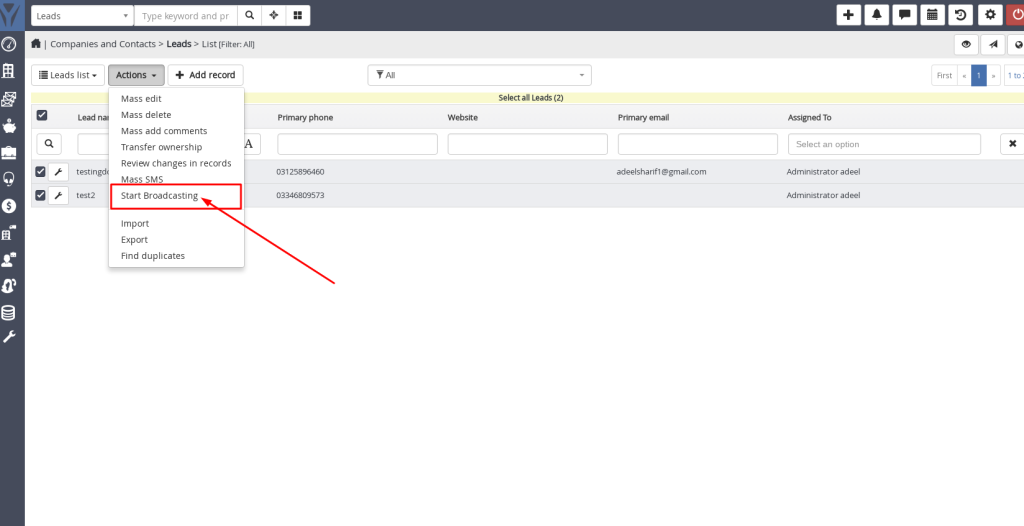
- Go to the Leads menu.
- Select Leads from the list.
- Click the Actions button at the top of the list.
-
- Choose Start Broadcasting
- Enter the Contact Group Name, select the campaign type, upload your message, and click on the Send Button

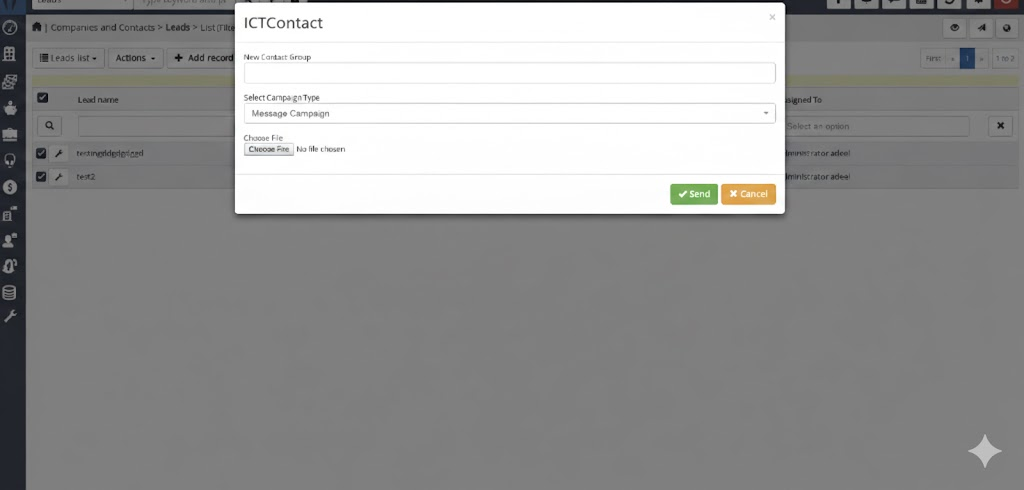
Note: For Message or Press-1 Campaigns, upload a .wav file. For Fax Campaigns, upload a .tiff or .pdf file.
The integration, using REST APIs, automates business processes and allows users to create and run campaigns directly from CRMs such as SuiteCRM, VtigerCRM, EspoCRM, and SugarCRM Community Edition.