
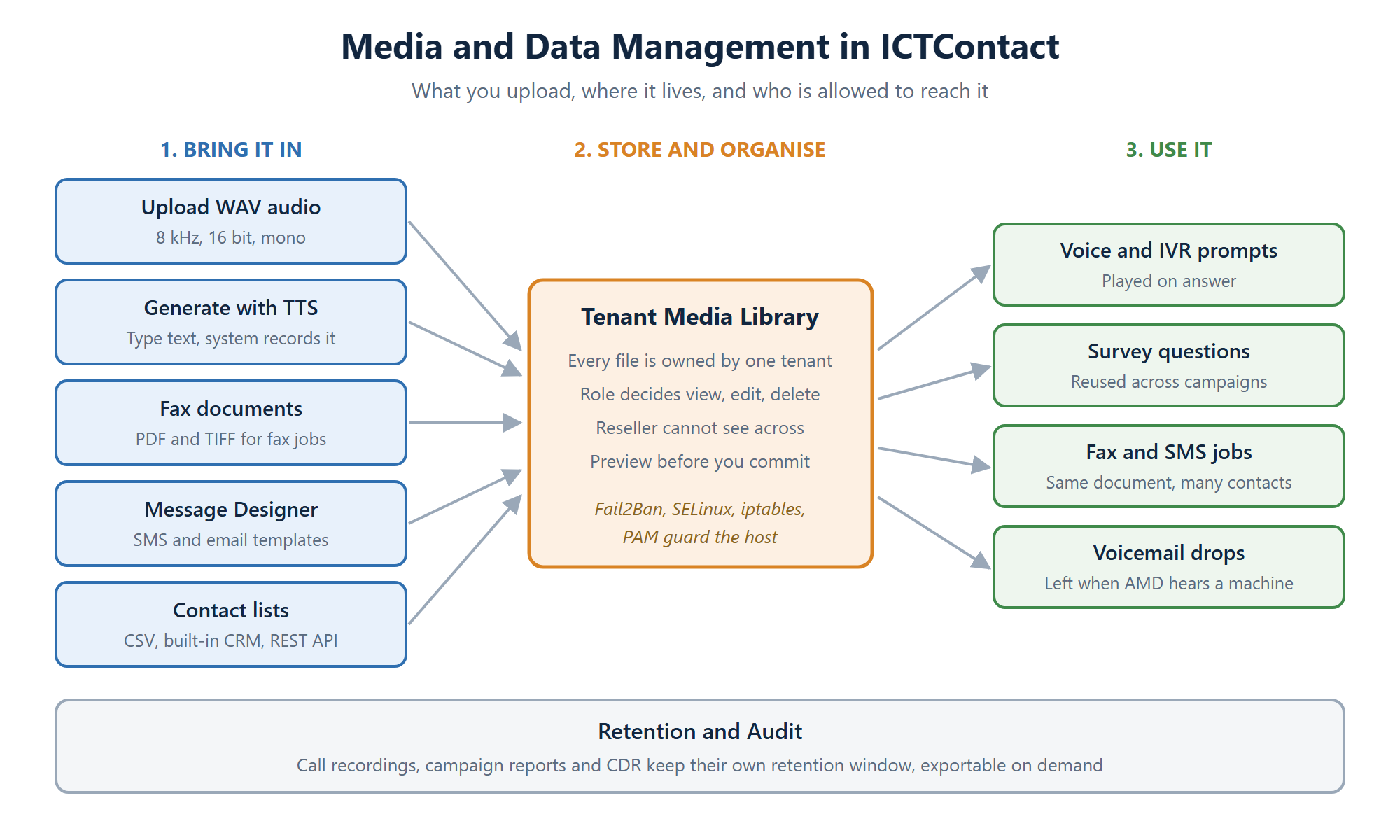
ICTContact keeps every campaign asset in one place: voice recordings, IVR prompts, survey questions, fax documents, message templates and contact lists. You upload a file once, and any campaign in your tenant can reuse it. Nothing is shared across tenants, and roles decide who may view, edit or delete each item.
That sounds like housekeeping until the first time an agent plays the wrong prompt to four thousand people. Getting media management right is what stops that happening.
The three stages every asset goes through
Getting audio into the system
You have two routes and they suit different jobs.
Upload a recording. The telephony stack needs a specific format: 8 kHz sampling rate, 16 bit, mono WAV. That’s not ICTContact being fussy, it’s what the call path expects. Anything else either won’t load or will sound wrong on the line. Windows Sound Recorder, Audacity or an open source tool like espeak, flite or festival will all produce it. Commercial voices from cepstral, ispeech or voiceforge work too.
Type it and let the system speak it. If you don’t have a recording, switch the recording type to Text and write what you want said. Text to speech generates the audio for you. It’s faster for anything you’ll change often, like a date or a price. For your main brand greeting, a human voice still sounds better.
Either way you can play the result back before attaching it to a campaign. Do that. It takes ten seconds and it catches the wrong file long before your contacts do.
Documents, templates and contacts
Audio isn’t the only thing you store. Fax documents live in the same library and get attached to fax jobs the same way a recording gets attached to a voice campaign, so one document can go to a whole contact group. The built-in Message Designer handles SMS and email templates without you needing another tool, and it supports the merge fields that turn a generic blast into something that reads like it was written for one person.
Contact data comes in by CSV import, from the built-in CRM or over the REST API. Grouping matters more than people expect. Clean groups let you run different pacing, different time windows and different suppression rules per segment instead of treating one giant list as a single audience.
Multi-tenant isolation is the part that matters
If you run ICTContact as a service provider, media separation isn’t a nice-to-have. Every file belongs to exactly one tenant. A reseller sees their own library and their customers’ libraries below them, never sideways into another reseller’s. Roles inside a tenant then control the rest: who can upload, who can overwrite, who can only pick from what already exists.
The practical effect is that you can hand campaign building to a junior operator without giving them the ability to delete the recordings everyone else depends on. See multi-tenant contact center software for how the tenant tree is structured.
What protects the data underneath
Access rules in the application only help if the server holds up. ICTContact runs on Linux and uses the standard layers rather than anything exotic:
- Fail2Ban watches Asterisk and SSH logs, then bans addresses showing repeated password failures or probing for exploits.
- SELinux applies mandatory access control, so a compromised process still can’t wander outside what it’s permitted to touch.
- iptables filters at the packet level and keeps management interfaces off the public internet.
- PAM centralises authentication so account policy is enforced in one place.
The full list is on security features in ICTContact.
Recordings, reports and how long you keep them
Call recordings and campaign reports are data too, and they grow faster than anything else on the system. Recordings in particular will fill a disk quietly over a few months of heavy dialing. Decide your retention window early, base it on whatever your industry actually requires rather than keeping everything forever, and export what you need out to your own storage. Campaign statistics and CDR export cleanly for that.
A short checklist before you launch a campaign
- Play back every recording attached to the campaign, including the voicemail drop.
- Check the contact group count matches what you expected. A bad CSV usually shows up as a wildly wrong number.
- Confirm your suppression list is applied to this campaign and not just uploaded.
- Send one fax or SMS to yourself before releasing the batch.
- Check free disk space if recording is switched on.
Frequently asked questions
What audio format does ICTContact need?
WAV at 8 kHz sampling rate, 16 bit, mono. That’s what the telephony layer plays. If your file was recorded at 44.1 kHz stereo, convert it first. Most audio tools do this in one step.
Can I use text to speech instead of recording audio?
Yes. Set the recording type to Text, write what you want spoken, and the system produces the audio. It’s the quicker option for prompts that change regularly. Recorded human audio is still worth it for greetings that every caller hears.
Can one tenant see another tenant’s recordings?
No. Media is scoped to the tenant that owns it. A reseller can reach the accounts beneath them in their own branch and nothing outside it.
How do I load contacts from another system?
CSV import covers most cases. For anything automated, the REST API lets your CRM or billing platform push contacts and start campaigns without a person logging in.
How long are call recordings kept?
You set the retention period. There’s no fixed limit imposed by the platform, which means the decision, and the disk space, are yours. Export to external storage if you need to hold recordings long term.
Can I reuse the same recording across several campaigns?
You can, and you should. Upload once, attach it wherever it’s needed. When the message changes you update one file rather than hunting through every campaign that used a copy of it.