
If you are wiring a speech model into Asterisk, the first real decision is how audio leaves the call. AudioSocket gives you a plain TCP stream of 8 kHz PCM and hands you responsibility for timing. The newer WebSocket channel driver carries most codecs and does the reframing for you, but only on recent builds. Your Asterisk version usually settles the argument before preference does.
This question comes up constantly in the Asterisk community right now, and the answers tend to skip the parts that bite you in week two. So here is the comparison with the sharp edges left in.
What AudioSocket actually gives you
AudioSocket is deliberately small. You call it from the dialplan as AudioSocket(uuid,host:port), or set it up through ARI external media, and Asterisk opens a TCP connection to your process. Every message is a three byte header, one byte of type followed by two bytes of big endian length, then the payload. Type 0x01 carries the 16 byte call UUID, 0x10 carries audio, 0x00 is a hangup.
The audio format is fixed: signed linear 16 bit, 8 kHz, mono, which works out to 320 bytes for every 20 ms of speech. That constraint is the whole story of AudioSocket, both the good and the bad. Good, because there is nothing to negotiate and nothing to decode, so a working prototype takes an afternoon. Bad, because if your speech stack prefers 16 kHz you are transcoding at both ends and paying for it in latency and quality.
The protocol carries no call control at all. It cannot transfer, hold, hang up politely or read a channel variable. Every production deployment I have seen pairs it with ARI, AMI or AGI for the control plane, which is fine, but it means two connections and two failure modes rather than one.
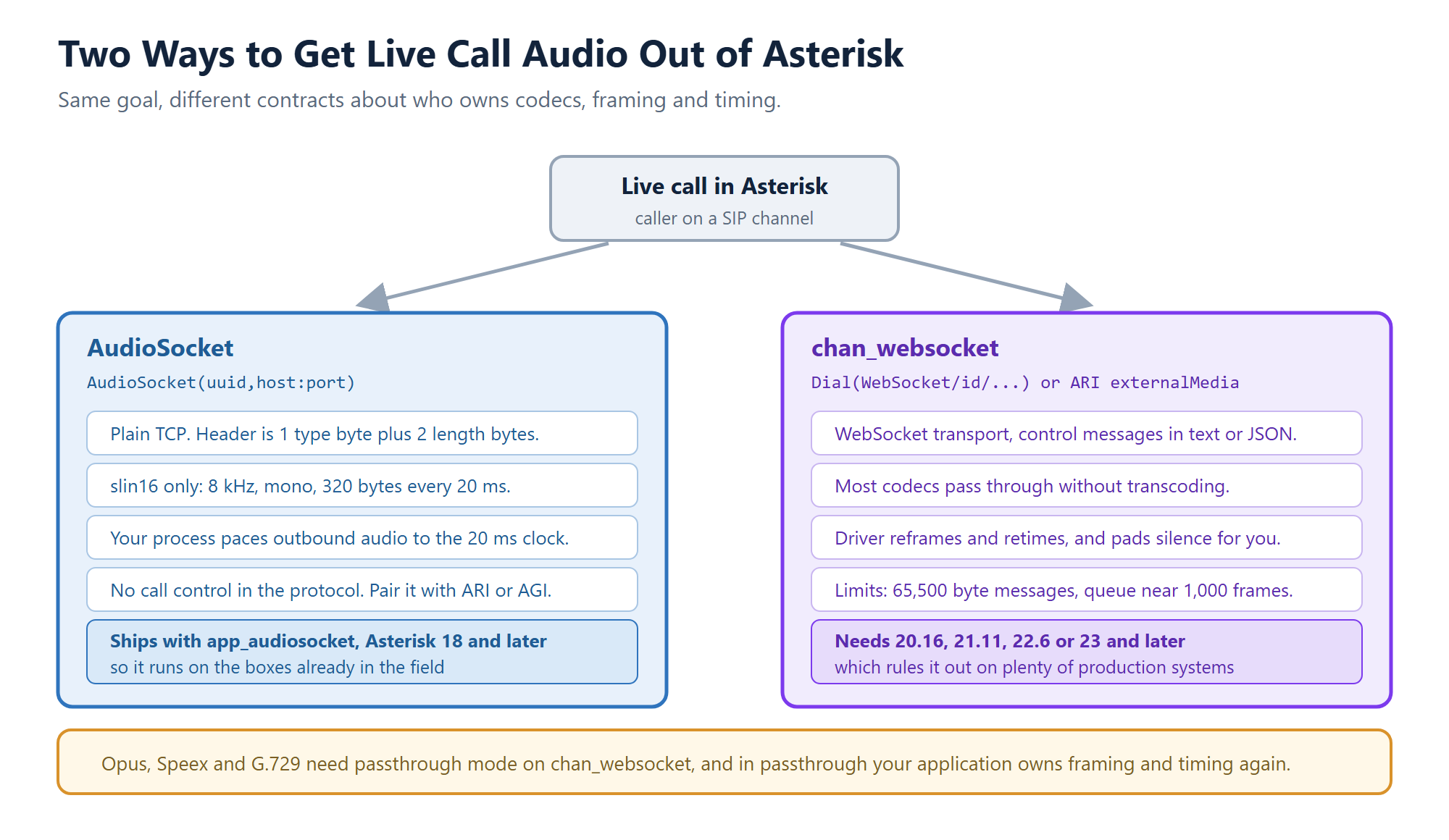
Same destination, different contracts about who owns codecs, framing and timing.
The 20 ms clock is where most first attempts fall apart
Here is the failure that catches nearly everyone. Your text to speech engine returns a whole sentence, three seconds of audio, and you write it to the socket in one go because that is what the buffer contains. The call sounds broken. Callers hear the tail end of phrases, or a burst of speech followed by silence.
Asterisk writes what you send when you send it. Dump three seconds of audio into the socket at once and you have just overrun the jitter buffer at the far end. The fix is not clever: meter the outbound audio to the same 20 ms frame clock the protocol assumes, one 320 byte frame every 20 ms, with a deadline so a slow synthesizer cannot make the writer burst to catch up.
We hit this building the ICTContact voice agent and eventually pulled the plumbing out into a small MIT licensed library, asterisk-audiosocket on GitHub and npm, which handles the frame codec, reassembles frames split across TCP reads, and paces playback so this specific problem stops happening. It has no runtime dependencies. If you would rather write your own, the pacing logic is the part worth copying.
Where chan_websocket changes the deal
The WebSocket channel driver moves that responsibility back into Asterisk. It is available from releases 23.0.0, 22.6.0, 21.11.0 and 20.16.0, either as Dial(WebSocket/ or through ARI at /channels/externalMedia with transport=websocket and encapsulation=none. Outbound connections are configured in websocket_client.conf, and chan_websocket.conf currently sets whether control messages arrive as plain text or JSON.
Three things it does that AudioSocket will not. It supports most Asterisk codecs rather than one, so you can often avoid transcoding entirely. It reframes and retimes incoming media for standard codecs, and inserts silence to hold timing when your application goes quiet, which removes the pacing problem described above. And it publishes a MEDIA_WEBSOCKET_OPTIMAL_FRAME_SIZE channel variable, plus START_MEDIA_BUFFERING and STOP_MEDIA_BUFFERING for variable sized transfers, so you are not guessing at message sizes.
The limits are worth reading before you commit. Maximum WebSocket message size is 65,500 bytes. The frame queue holds roughly 1,000 frames, about 20 seconds of audio, so a stalled consumer will start dropping rather than growing forever. And opus, speex and g729 need passthrough mode, where the driver stops reframing and your application owns framing and timing again. If you picked chan_websocket specifically to avoid pacing code and then enabled opus passthrough, you have quietly signed up for the same work.
Your Asterisk version has probably already decided
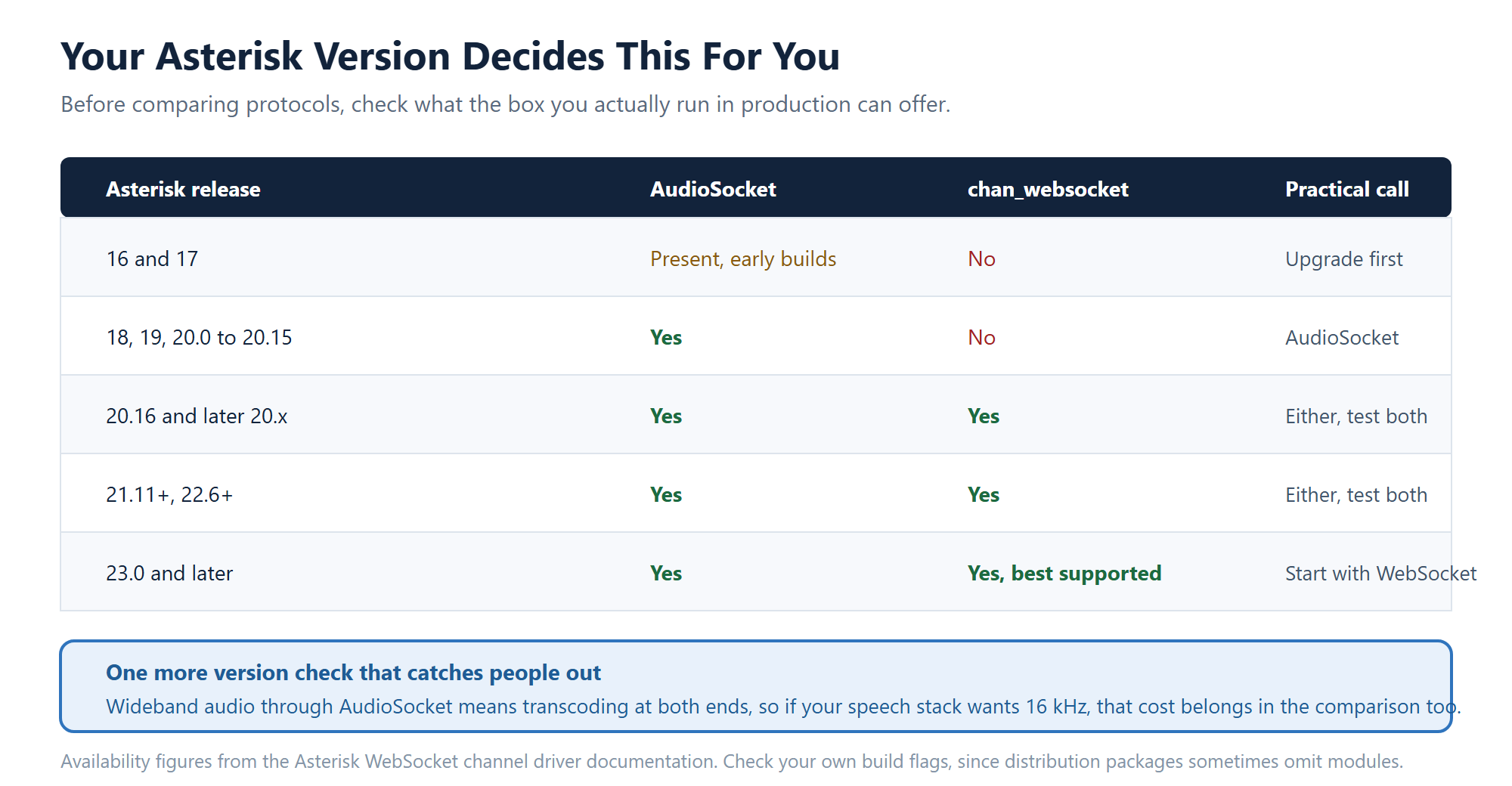
Check the box you actually run in production, not the one on your laptop.
For most teams the practical answer is simple. If you are running Asterisk 18 through 20.15, which describes a large share of systems in the field, AudioSocket is your path and the pacing work is unavoidable. If you are on 20.16 or later, 21.11, 22.6 or 23, try chan_websocket first, especially when your speech stack speaks a codec Asterisk already carries, since skipping transcode saves both latency and CPU on busy nodes.
My own bias, for what it is worth: on a greenfield build targeting Asterisk 23, chan_websocket is the better long term bet because it is where the project is investing and because ARI integration is cleaner. On an existing platform with customers on older releases, AudioSocket earns its place by running everywhere and being small enough that very little can break. Upgrading a production PBX to chase a nicer media API is rarely the trade it looks like on paper.
Things to test before you call it done
Whichever path you pick, the same handful of scenarios separate a demo from something you can put on a queue.
- Barge-in. When the caller talks over the agent, how fast does playback actually stop? Measure it, do not assume it.
- Hangup mid-sentence. Both sides need to notice and release the call, including when the caller drops during synthesis.
- A slow model. Stall your speech service for two seconds and listen to what the caller hears. Silence is acceptable. Garbled catch-up is not.
- Concurrency. Run 30 calls at once and watch CPU on the media path. Transcoding costs show up here, not in single call tests.
- Reconnects. Kill your media process mid-call and see whether Asterisk cleans up the channel or leaves it hanging.
That list is short on purpose. Every one of those items has taken down a voice agent demo somewhere, usually the third one.
Frequently asked questions
Which Asterisk version added chan_websocket?
It is available starting with releases 23.0.0, 22.6.0, 21.11.0 and 20.16.0. Anything older needs AudioSocket or an ARI external media path over RTP.
Can AudioSocket do wideband audio?
Not natively. The protocol carries signed linear 16 bit at 8 kHz, mono. Feeding a 16 kHz speech model means transcoding on the way in and back down on the way out, so budget for the quality and latency cost.
Does either option handle transfers and call control?
No. Both are media transports. Use ARI, AMI or AGI alongside them for transfers, holds, queue moves and variable access, and plan for the case where the media connection is alive but the control connection is not.
Why does my synthesized speech sound clipped or rushed?
Almost always outbound pacing. Write one 20 ms frame at a time rather than a whole utterance at once. On chan_websocket, check whether you enabled passthrough mode, because that hands timing back to your application.
Do I need to build any of this to run an AI voice agent?
Only if you are building the platform. ICTContact ships an AI voice agent with personas, mid-call actions and stored transcripts, so the media path is already handled. The comparison above matters when you are integrating your own models or extending the platform.
Where ICTContact fits
ICTContact is Asterisk based contact center software with the AI voice agent built in, so calls, dispositions and transcripts land on the same record without a media integration project. If you do want to extend it, the same open interfaces are described in building custom modules with the open APIs, and the full capability list lives on the features page. For architecture questions on your own deployment, open a support ticket and we will go through it.