
You can now point an AI assistant at your own ICTContact install and ask it questions in plain English. Which campaigns ran overnight, which ones stalled, what the answer rate looked like on Tuesday. It reads through a small program on your machine called an MCP server, and every tool that could place a call or spend money is switched off until you switch it on.
That last part is the design decision worth explaining, because it is the opposite of how most integrations work.
What an MCP server is, without the jargon
Model Context Protocol is an open standard for handing an AI assistant a set of tools. Not documentation about your system, actual callable tools. The assistant sees a list of things it can do, picks the right one for the question, and gets structured data back instead of guessing.
An MCP server is the small program that publishes those tools. Ours is ictcontact-mcp. It runs on your machine, signs in to your ICTContact with your own account, and translates a question into the same API calls you could make yourself.
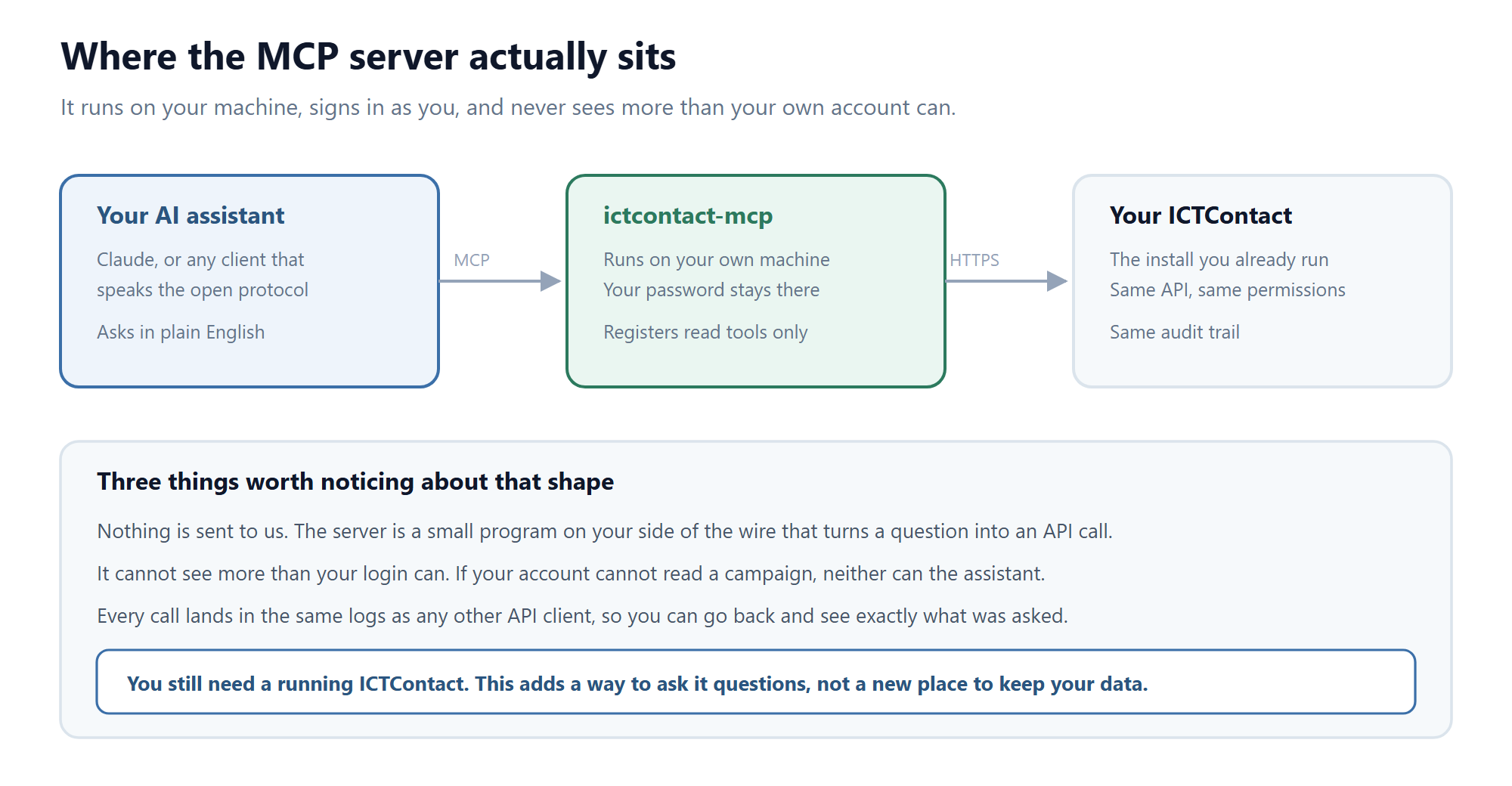
Three things follow from that shape. Nothing is sent to us. The assistant cannot see anything your own login cannot see. And every call lands in the same logs as any other API client, so you can go back afterwards and check exactly what was asked.
Read is the default, and write is not hidden behind a prompt
The tools that change something or cost money are not registered with the assistant at all unless you set an environment variable. Not greyed out, not guarded by a confirmation dialog. Absent.
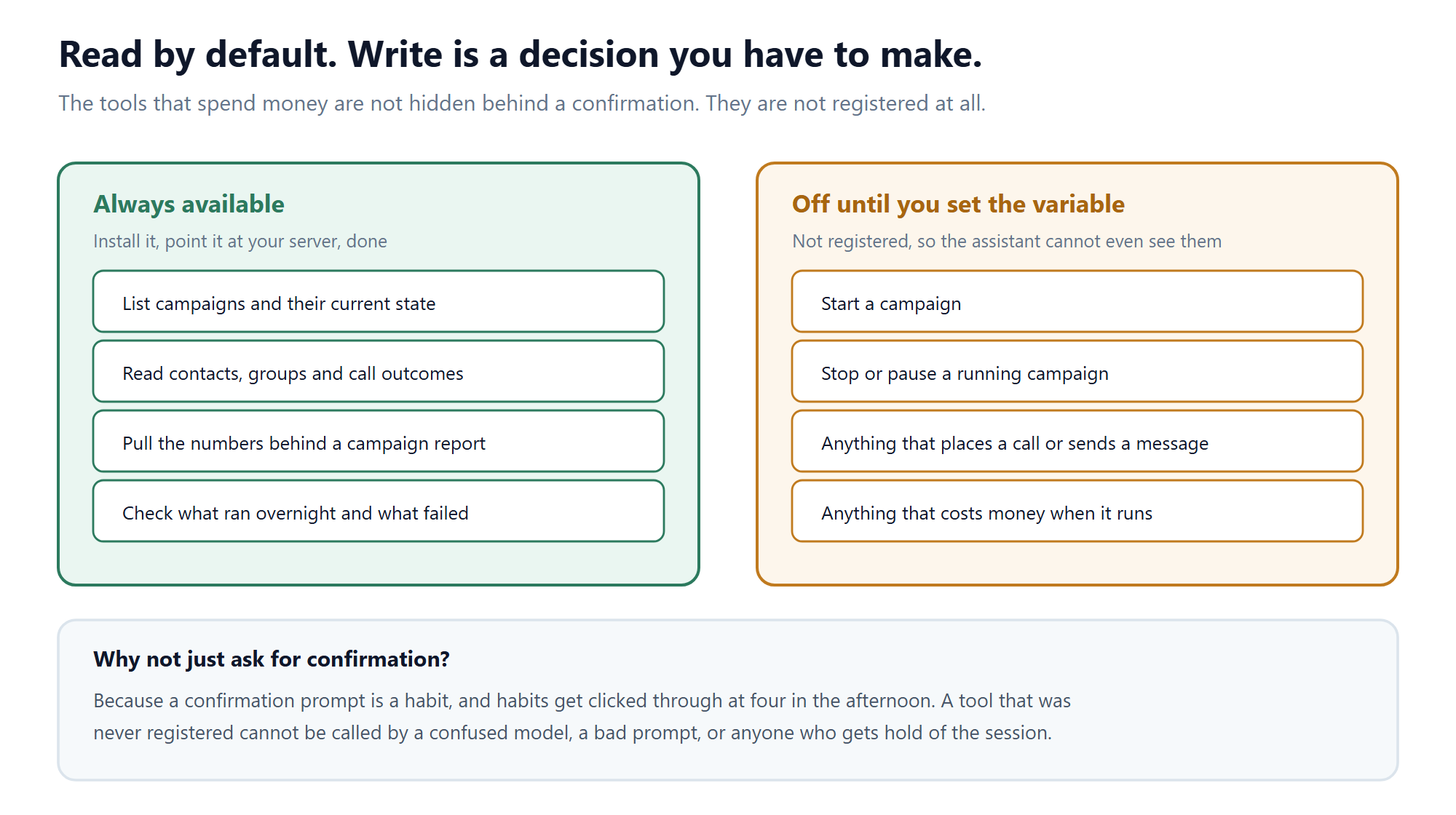
We went that way rather than using confirmations for a boring reason. A confirmation prompt becomes a habit, and habits get clicked through late in the afternoon. A tool that was never registered cannot be called by a confused model, a badly worded instruction, or anyone who gets hold of the session. If you never enable writes, the worst case for a compromised assistant is that it read something it should not have, which is the same risk profile as a read-only reporting login you probably already have.
When you do want writes, you turn them on for that one server, on that one machine, deliberately.
What it is actually useful for
The honest answer is that it replaces a specific kind of tedium rather than doing anything dramatic.
- The morning check. Ask what ran overnight, what completed, and what stopped early. One question instead of four screens.
- Chasing an anomaly. When a campaign underperforms, the follow-up questions are the slow part. An assistant that can pull the numbers while you are still thinking about them shortens that loop considerably.
- Reporting that does not fit a report. Comparisons across campaigns, date ranges or groups that the built-in reports were never shaped for.
- Onboarding. A new supervisor can ask how something is configured without needing to know which menu it lives under.
What it is not is an autopilot. It has no judgement about whether a campaign should run, and with writes off it could not start one anyway.
Installing it
With Node 18 or newer, there is no install step:
npx -y ictcontact-mcpYou give it your ICTContact URL and your own credentials, and add a small config block to whichever MCP client you use. The README carries the full tool list and the config block. Source is on GitHub under ICT Innovations, the package is on npm, and it is listed in the MCP Registry.
Any MCP client works. We test with Claude, but the protocol is open and the server does not care who is on the other end.
The rest of the set
ICTContact is one of several. There is a server per product, each wrapping that product’s API and following the same read-first rule: ICTBroadcast for voice, SMS and fax broadcast campaigns, ICTDialer for the cloud auto dialer, ICTFax for sending and tracking faxes, ICTPBX for extensions, trunks and tenants, ICTCRM for contacts and groups, and ICTExam for assessments. A separate one, pbx-mcp, works against plain Asterisk or FreeSWITCH rather than any product of ours.
If you run more than one of these, the servers compose. An assistant with both the contact center and the CRM connected can answer questions that neither system answers on its own, without either one needing to know the other exists.
For the platform itself, the contact center software overview covers what ICTContact does, and the AI Voice Agent guide covers the other side of the AI story, where the AI talks to your callers rather than to you. The two are unrelated in the code and often confused in conversation.
Frequently asked questions
What is an MCP server?
A small program that hands an AI assistant a set of tools over the open Model Context Protocol, so it can act on a system instead of only describing it. It runs where you put it and talks to whatever you point it at.
Does my data go to you or to the AI provider?
Not to us. The server runs on your machine and talks straight to your ICTContact install, and your password never leaves that machine. Whatever your assistant reads does travel to whichever AI provider you use, exactly as it would if you pasted the same numbers into a chat window, so treat it with the same care.
Can the assistant start or stop a campaign?
Only if you set the allow-write variable for that server. By default those tools are not registered, so the assistant cannot see them and cannot call them. Reading is the default state and it takes a deliberate act to change that.
Which AI assistants does it work with?
Any client that speaks MCP. We test with Claude. The protocol is open, so support is spreading across desktop assistants and development tools.
Do I need ICTContact to use it?
Yes. It talks to a running install that you point it at. It is a way to ask your system questions, not a hosted service or a new place to store anything.
Is it free?
Yes. Open source on GitHub, published on npm, no licence tied to it. You still need your ICTContact install and whatever you pay your AI provider.
Built by ICT Innovations. Issues and pull requests on the GitHub repositories are welcome, and several tools in the current release came from them.