IVR, or Interactive Voice Response, is an automated telephony system that interacts with callers using voice prompts and keypad inputs. It enables callers to navigate options and reach the appropriate department without a live agent.
By automating call routing, IVR systems significantly reduce wait times, improve call handling efficiency, and help call centers manage high call volumes more effectively.
IVR Designer allows you to create advanced telephony systems with a simple drag-and-drop interface. The user can pick any application from the toolbar area, then drag it to the main drawing area and drop it. This will create that application at the dropped location. Its drag-and-drop interface makes it easy for users to create voice response applications in a web browser. IVR Designer’s toolbar contains the applications to create an IVR. Read the IVR Designer tutorial
How IVR Designer Works in Contact Center Software?
Interactive Voice Response (IVR) systems are no longer limited to large enterprises. Today, businesses of all sizes, including small and boutique marketing firms, use IVR technology to automate and streamline call handling. IVR systems can be used for both inbound and outbound calls, with one of their biggest advantages being intelligent call routing.
When a caller connects, the IVR system plays automated voice prompts and waits for input through keypad selections or voice commands. Based on the caller’s response, the system can deliver recorded information, offer self-service options, authenticate the caller, or route the call to the most suitable department or agent.
A common example is banking services, where callers hear menu options such as checking account balances, accessing credit card information, or speaking to customer support. Instead of relying on a live operator, the IVR system guides the caller efficiently, reducing wait times and improving service accuracy.
IVR technology has evolved significantly since its early introduction decades ago. What started as basic touch-tone menus has developed into a widely adopted communication solution across industries such as telecommunications, healthcare, banking and finance, retail, travel, and hospitality. Its continued growth is driven by the need for faster response times, better customer experience, and efficient call volume management.
Advantages and Disadvantages of IVR Systems
Interactive Voice Response (IVR) systems are widely used to improve call handling efficiency and reduce operational workload. While they offer clear advantages in terms of automation and availability, they can also introduce challenges if not designed and implemented correctly. Below is a balanced overview of the key benefits and limitations of IVR systems.
Advantages of IVR Systems
Cost Savings
IVR systems help reduce operational expenses by automating repetitive and routine customer interactions. This lowers dependency on live agents and optimizes workforce allocation. Studies referenced by organizations such as IBM indicate that IVR implementations can significantly reduce customer service costs when used effectively.
Increased Efficiency
IVR systems are capable of handling multiple calls simultaneously without delays. Unlike human agents, they do not require breaks or shift rotations, allowing businesses to manage higher call volumes efficiently and reduce caller wait times.
24/7 Availability
IVR systems provide round-the-clock access to information and self-service options, making them ideal for businesses serving customers across different time zones. Many financial institutions, including Chase and Bank of America, use IVR systems to enable customers to check balances, make payments, and access account information without speaking to a live agent.
Disadvantages of IVR Systems
Potential for Customer Frustration
Poorly designed IVR menus, long prompts, or complex navigation can lead to customer dissatisfaction. Research shared by American Express has shown that a significant number of customers abandon calls when IVR systems are confusing or time-consuming.
Lack of Personalized Interaction
IVR systems lack emotional intelligence and empathy, which some customers expect during support interactions. Studies by Accenture highlight that many customers still prefer human assistance, especially when dealing with sensitive or complex issues.
Limited Capabilities
IVR systems are best suited for handling simple and repetitive tasks. Complex, unique, or highly specific inquiries often require human intervention. Additionally, IVR systems must be regularly updated and maintained to remain effective and relevant.
IVR Designer in ICTContact Contact Center Software:
ICTContact is an Advanced Contact center software that is bundled with an interactive web-based IVR Designer that enables its users to design custom IVR menus as they choose. IVR Designer / IVR Studio is simple, easy to understand, and is based on a drag-and-drop feature. Once a user has created an IVR, ICTBroadcast can broadcast and play these IVRs to its customers.
Advanced IVR Designer in ICTContact
ICTContact has a super advance and super user-friendly IVR Designer / IVR studio that allows you to create advanced telephony systems with a simple drag-and-drop interface. The user can pick any application from the toolbar area, then drag it to the main drawing area and drop it. This will create that application at the dropped location. Its drag-and-drop interface makes it easy for users to create voice response applications in a web browser. IVR Designer’s toolbar contains the applications to create an IVR. Read IVR Designer Tutorial
Each IVR application is different, but a standard sequence is followed by most. The caller dials in, to begin with, and is greeted by a pre-recorded voice. Before providing multiple menu options, the IVR can start by asking for language preferences. “Press 1 for more information. Press 2 for the technical department. Press 3 for other menus. Press 4 for the operator.” The call is forwarded to an appropriate call center representative based on the response of the caller.
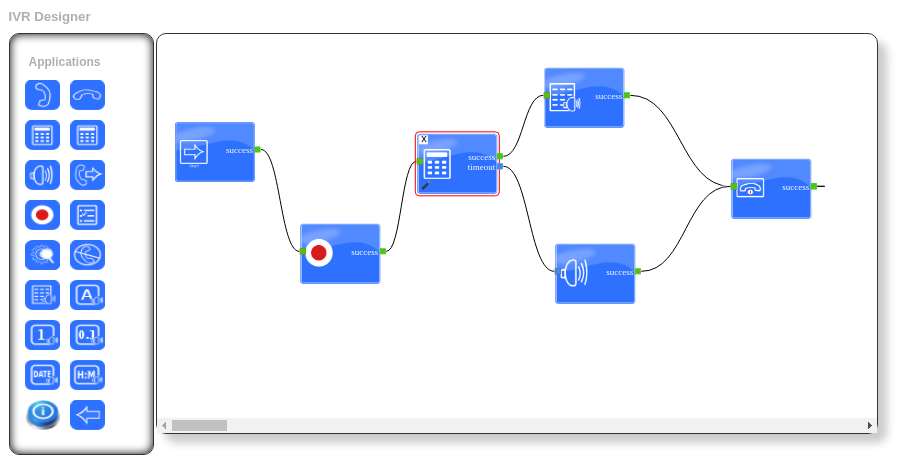
Brief Description of IVR Designer’s Applications:
The following are brief descriptions of IVR applications
Call Answer
Call answer applications are used for answering an incoming call

Call Hangup
The hangup application is used to disconnect a call.

Get Input
This application is used to get any input request from your IVR.

Condition
After getting value from Get Input, we can handle the call accordingly.

Play Audio
This application plays a sound file. You can use sound files from the Recording section in the settings area.

Call Transfer
The Transfer application connects the active call to a specified phone number of an agent. This number is referred to as the Extension number in ICTContact.

Call Record
The Record application can either create a recording, which starts with a beep and ends with the user pressing pound, or it can record the remainder of the call.

Answering Machine Detection (AMD)
This application detects after answering a call whether it is a human or a machine. Then on the basis of this decision, the user can perform any action.

Do Not Call (DNC)
DNC Application: add a number to the DNC list, then the system will detect the number as DNC and not dial it.

Text-To-Speech (TTS)
TTS application allows users to enter the text that will be played as sound.

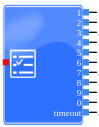
Options Menu
Options Menus are used to gather keypad input from the user. Each menu node requires at least one “Play” node to present options to the user, and one or more “Key Press” nodes to handle the incoming key presses.
Say Alpha
Say Alpha application allows you to enter an alphanumeric value or select a variable and then play that value.

Say Number
Say Number application allows you to enter a number or select a variable and then play that value.

Say Date
Say Date application allows you to enter a date or select a variable and then play that value.

Set Caller ID
This application will set the caller ID, e.g., while we are transferring the call to an agent, we can set our desired caller ID.

URL Integration in IVR Designer
The URL option in the IVR Designer of ICTContact enables seamless integration between IVR call flows and third-party applications. This feature allows businesses to automate actions by triggering external APIs directly from an IVR menu based on caller input.
In simple terms, when a caller presses a specific digit during an IVR interaction, ICTContact can invoke a predefined API and perform an action in another system without requiring agent involvement.
How URL Integration Works in IVR
- An IVR is created using the ICTContact IVR Designer
- The URL option is configured at a specific IVR step
- A third-party API endpoint is defined in the URL field
- When a caller presses the assigned digit, ICTContact calls the configured API
- Based on the API response, the IVR flow can proceed accordingly
This enables real-time communication between the IVR system and external software platforms.